


How to Improve Your PowerPoint Slides with the Rule of Thirds
 Designing attractive slide visuals does not need to be a painful task. You don’t need to hire a design firm. You don’t need loads of expensive software.
You can design attractive visuals by following simple guidelines. One of these simple guidelines is the Rule of Thirds — a composition technique borrowed from photography and other visual arts that works wonderfully in PowerPoint.
In this article, you will learn:
- What is the Rule of Thirds?
- How do photographers use the Rule of Thirds?
- How can you apply the Rule of Thirds to Your PowerPoint slides?
- Articles
- Slide Titles
- Slide Fonts
- Slide Charts
- Rule of Thirds (Layout)
- Contrast, Repetition, Alignment, Proximity
- Book Reviews
What is the Rule of Thirds?
The Rule of Thirds is a guideline for composition that suggests placing key graphic elements along lines which divide your image into thirds, or at the intersections of those lines.
What does that mean? I’m glad you asked.
Imagine your PowerPoint slide is divided both vertically and horizontally into thirds, like this:
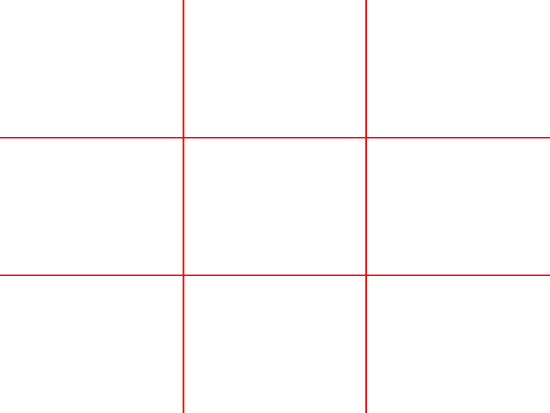
PowerPoint Tip: You can use the guides feature to draw these four lines into your PowerPoint template. They will then appear on every slide to help you compose your slide.
- The vertical lines divide your image into thirds.
- The horizontal lines divide your image into thirds.
- Together, they divide your image into 9 equal areas.
- These lines intersect at four points — known as Power Points. (Seriously! They really are!)
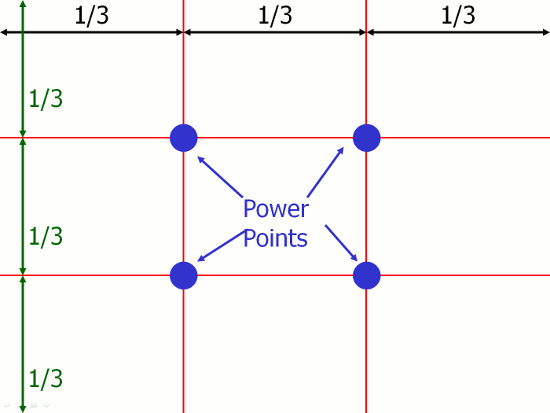
How do Photographers Use the Rule of Thirds?
 Rule #1 – Place Key Elements of Your Composition at Power Points
In this example, the key element is pretty obvious — the tree.
Rather than centering this element in the photograph, the artist has chosen to center it on over the top-left Power Point.
Even in an image with more elements (i.e. not just a “grass” background), the viewer’s eye is drawn to these Power Points. By placing key elements at one or more of these Power Points, you achieve maximum impact.
 Rule #2 – Place Key Elements of Your Composition Along Horizontal Lines
Novice photographers are tempted to place the horizon in the middle of the frame. This is generally not the best approach.
In this example, the photograph has placed the horizon (and also the line formed by the tops of the horses) along the lower horizontal line.
Additionally, the upper horizontal line conveniently divides the upper dark blue sky from the lower cloud-covered sky.
The overall effect is balance between the three horizontal bands of color from top to bottom: dark blue, white, and brown.
 Rule #3 – Place Key Elements of Your Composition Along Vertical Lines
This example shows the book cover of Nancy Duarte’s excellent slide:ology (previously reviewed by Six Minutes).
This isn’t a photograph, but the designer has (consciously or unconsciously) applied the rule of thirds.
Here, the white silhouette of the presenter is bisected by the left vertical dividing line.
Appropriately, Duarte writes this in slide:ology about the Rule of Thirds:
Composing your photos based on a simple grid of thirds is a trick used by movie producers, graphic designers, and professional photographers. Using the rule of thirds leads to aesthetically pleasing and professional-looking imagery.
 Rule #4 – Place Key Elements of Your Composition at Power Points and simultaneously on Dividing Lines
In this example, the upper horizontal line lies across the horizon, separating the sky in the upper third from the water in the lower two thirds.
Simultaneously, the woman in this photograph is placed on the upper-right Power Point.
Furthermore, consider the line that is formed from the top of the woman’s head, down the middle of her back, and right through to the reflection on the water. Where is it? Centered on the right vertical dividing line.
So, this photograph blends elements on two of the four lines and one of the Power Points.
Does the Rule of Thirds Really Result in More Pleasing Compositions?
Are you skeptical?
I was. So, I decided to perform a simple test with the audiences of a PowerPoint seminar that I have given several times.
My test photograph is a landscape photo shown in the upper left of the four images below. By zooming this image slightly, and then moving it up and down on a slide, I created the three slides shown below (without the rule of thirds dividing lines that you see here, of course).
- Slide A shows the tree line down the middle of the photograph.
- Slide B has the tree line lying along the upper horizontal dividing line.
- Slide C has the tree line lying along the lower horizontal dividing line.
Each time I give this seminar, I ask the audience a simple question: “Which of the three slides is most pleasing to you?”

The result?
Less than 5% of audience members choose Slide A. Some say “It’s boring.” Others remark that “I couldn’t decide what was important in the photo.”
Slides B and C were chosen roughly half of the time. Audience members found one or the other (or both) to be “pleasing” and “interesting.” Is it a coincidence that both of these slides use the Rule of Three, while slide A did not?
Which of the three do you like best?
How Can You Apply the Rule of Thirds to Your PowerPoint Slides?
- Look for photographs which obey the Rule of Thirds
If you are using photographs which bleed right to the edges of your slides (a good way to achieve maximum impact), try to choose photographs which use the Rule of Thirds. - Scale, crop, or position photographs to follow the Rule of Thirds
When scanning photographs, use your mental viewfinder to find a small area within a larger photograph that you can use. For example, suppose the tree/grass example above were originally a much larger photograph with a tree in the middle. By cropping asymmetrically, you can create a more pleasing image using simple photo editing tools. This is easily done in Photoshop or any photo editing software. - Combine images with text so that one or both obey the Rule of Thirds
Two great ways to do this are to choose photographs with either:- Large areas of uniform color on top of which you can place text with good contrast, OR
- A solid color background (white works best!) so that you can move the photograph around seamlessly on top of the slide background.
The example below is the title slide from one of my presentations. I used a stock photo which provides a visual metaphor for my topic (i.e. the blue piece stands out among all the yellow pieces). Since this photograph has a white background, I was able to place it off-center so that the blue piece landed on the upper-left Power Point. I then placed my slide text (in a matching color) centered on the lower horizontal line, anchored on the right vertical line.

Below are two more examples taken from my presentation design course.
On the left, I cropped a much larger photograph so that the stream of water falls along the right vertical line. Further, it hits the overflowing glass at exactly the lower horizontal line. Since the image background is out of focus, it provides good contrast for black text which I centered on the upper horizonal line.
On the right, I took a photograph of a trash bin and a white background and placed it on top of the lower-right Power Point. The white background of the photograph blends perfectly with the clean, white slide background. The text is positioned carefully with the most dramatic word — disaster — bolded and placed on the upper-left Power Point.

- Articles
- Slide Titles
- Slide Fonts
- Slide Charts
- Rule of Thirds (Layout)
- Contrast, Repetition, Alignment, Proximity
- Book Reviews
Will Using the Rule of Thirds Take More Time?
When you first become conscious of it during slide design, it may take you longer to choose and lay out your slides. However, it will save time and improve your visuals in the long run.
In Presentation Zen (previously reviewed on Six Minutes), Garr Reynolds writes about the Rule of Thirds:
You need to limit your choices so that you do not waste time adjusting every single design element to a new position. I recommend that you create some sort of clean, simple grid to build your visuals on. […] Grids can save you time and ensure that your design elements fit more harmoniously on the display.
Further Reading: Rule of Thirds
Please share this...
This is one of many public speaking articles featured on Six Minutes.
Subscribe to Six Minutes for free to receive future articles.

- Woman sitting on edge of infinity pool by iStock.com/Bolot (license)
- Gallopers by iStock.com/muratkoc (license)
- Yellow Field by FreeImages.com/Brian Lary (license)
- Overflowing Glass 1 by FreeImages.com/Charles Thompson (license)
- To the Dump 1 by FreeImages.com/Eric Ortner (license)
Subscribe - It's Free!
| Subscribe via Email |  |
| Subscribe via RSS |  |
| Follow Us |


|
Similar Articles You May Like...
Find More Articles Tagged:
 43 Comments
 Recent Tweets
How to Improve Your PowerPoint Slides with the Rule of Thirds https://t.co/FivYKhNn4w #Toastmasters
— Heather Turner (@forfeng) Nov 13th, 2015
How to Improve Your PowerPoint Slides with the Rule of Thirds in #publicspeaking https://t.co/g1f93tycPe
— Alvin Plexico, PhD (@DrPlexico) Nov 14th, 2015
Rule of Thirds: Improve Your #PowerPoint Slides @6minutes https://t.co/VjeI4g8jaG
— @Geetesh Nov 14th, 2015
Lessons from photography to make your images shine #RuleOfThirds #GoodSlideas
https://t.co/B5bZFmLHtt
— @SweetSlideOMine Nov 16th, 2015
Find Out How to Improve Your #PowerPoint Slides with the Rule of Thirds https://t.co/wheMR2GC7s
— @Prezentt Jan 19th, 2016
How to Improve Your PowerPoint Slides with the Rule of Thirds https://t.co/X1rzWdJUQF by @6minutes
— Sleiman Skaf (@SleimanSkaf) Apr 20th, 2016
How to Improve Your #PowerPoint Slides with the Rule of Thirds https://t.co/gqaat7s6A0 by @6minutes
— @martinjason Nov 14th, 2016
How to Improve Your PowerPoint Slides with the Rule of Thirds https://t.co/UUhBDhqkWp by @6minutes
— @sw_econ Jan 9th, 2017
How to Improve Your #PowerPoint Slides with the Rule of Thirds https://t.co/2NoZtPuq44 by @6minutes #nsa17 #publicspeaking
— Joel Heffner (@JoelHeffner) May 14th, 2017
Rule of Thirds: Improve Your PowerPoint Slides https://t.co/oVT8bifbaq by @6minutes
— @svrcekigor Sep 21st, 2017
 16 Blog Links




Wow! This is a truly great post. Great reading. Very usable information. Excellent examples.
I look forward to exploring this site in greater detail.
Roger
Great post, Andrew. Makes the concept of slide design a little easier to grasp.
These are some really great tips – I knew about the rule of thirds before, but these are some great ways to implement it into my visuals for my presentations. Another excellent way to enhance presentations that I’ve stumbled across recently is using technology, things like polls or trivia questions to the audience.
great stuff,truly great.a muust read(and action!) for all speakers
Interesting article. In order to use this type of compositional style, you need to make sure that you simply limit the amount of stuff you put on the slides. The key is to start creating your presentation by focusing the message on a few key points. Then decide what you need to do to illustrate it.
Great post! I was familiar with this tip before, but this really helps drive home the point.
Great work!
MR
Very cool. You made this uber easy. Thank you!
Hi,
thanks for the nice post!
Funny coincidence, I had a very similar post on my blog just last week http://www.rethinkpresentations.com/the-rule-of-thirds-and-your-slides/
Regards,
Oliver
Great post! I’m working on a preso right now and I had forgotten all about the rule of thirds. Yeah, I’m going to have to go back and do a lot of work to make everything line up now, but the final product will be worth it!
Thanks for taking the time and providing so many examples!
Hi,
It’s a great post. I did not know the rule of the thirds before. I will implement in my next presentation.
Thanks.
Ven
great article! i want to use the tips.
however, i have difficulties setting the guides properly in Power Point.
i can move the guides only to pre-set position which make it impossible to set up the guides according to the rule of thirds.
can anybody help?
Great post, which I’ve put into use already.
Powerpoint has a default grid running horizontally and vertically through the mid point of slides.
To create the grid of thirds, press the Ctrl key while selecting a gridline and it will create a copy.
Hi
I am driven to your article buy the great ideas that you have proposed – thankyou very much.
Please explain my confusion within Rule #2 against Rule#3
Rule #2 – Place Key Elements of Your Composition Along Horizontal Lines…
Rule #3 – Place Key Elements of Your Composition Along Vertical Lines – which one is the one?
Thankyou
Anthonie
These indepth theoretical blog posts are thought provoking and enormously useful. Although I don’t have any Powerpoint projects cooking at the moment, I’ll be able to re-evaluate my slides against this advice next time. Many thanks. Rgds Vince
That sure forces one’s eye to a new critical level. Excellent article! I will do my best to apply this to my finished works to see if some can be improved.
Great post Andrew, I recently put together a short video explaining how this can be achieved in powerpoint by manipulating the drawing guidelines.
Here is it: http://clearlypresentable.wordpress.com/2009/11/23/the-rule-of-thirds-part-2-how-to-do-it/
Thanks for that, Ed!
Very nice presentation .. And then we see Andy’s picture sans the rule of 3.
Is this a topic for another post?
Thanks for this article, Andrew. It’s very helpful. I’m a former singer/actress, recently turned public speaker and presentation skills trainer. Although my main focus is on inner confidence and outer stage presence, I do use PowerPoint to illustrate things like what’s going on in the brain when you’re nervous. It’s funny, I use the “rule of thirds” in my own paintings, but it never occured to me to use it in PowerPoint slides. Thanks for helping me make my slides better.
Excellent article. Very clear and to the point. Your graphics and examples are fabulous.
Thanks!
Awesome! I knew about the rule of thirds for photography, but never applied it to powerpoint slides. Thanks!
This is a very helpful article; it will revolutionize the way I set up Powerpoint slides for Slideshare presentations from now on. Thank you so much for sharing! This article WILL be retweeted! You have sure got MY trust! Have any eBooks for sale? I may just buy them! Thanks again! BRILLIANT blog!! Great work!!
Thanks for such a great post and great site full of invaluable knowledge.
-muller
This is an excellent post, I have never thought of positioning slides in this way… will make use of this in the future -thanks!
Outstanding, Andrew!
I’ve always heard of this rule, but never quite understood it and the impact it can have on a slideshow.
You explained it exceptionally well and gave great visual examples.
Thanks for the Post!
This was an awesome article. I learned a lot. Thanks.
Gene
Great, exceptionally useful article, Andrew. Since we have such a great tool in PowerPoint, let’s all look at how we can increase our use of visuals through these guidelines to convey messages more powerfully, and stop cluttering up slides with too many W-O-R-D-S.
lidesI have been preparing slides, never thought of the four Power Points.
I agree they give a better presentation of the slides. I work again on the slides and request comments from the audience.
Thanks
Great info, Andrew. I knew a little about image composition for photography, but not to this level of detail. Interesting how the rules apply to PPT slides, as well.
So Informative! and you’re a great educator!
Fantastic – Thankyou, Thankyou, Thankyou
Great article. I learnt something in furtherance to my photography knowledge. Keep it up
This is really a great information. Thanks for sharing. Now I understand the secret behind great slide composition and how to apply it.
Thanks for the insightful advice.
Hey Andrew: Amazing and interesting post. I never knew about this concept but your discussion and examples really explains how it can work to your advantage. Thanks for all the practical and insightful tips. I am going to also pass this on to my wife who does a lot of work in this area. Best to you.
Andrew, in these days when people typically make more personal contact over the phone and Facebook than in person, and no longer know how to conduct themselves in face-to-face interactions, training in presentation will become a valued asset. I shared your Rule of Thirds as it applies to images shared on FB.
Another awesome, helpful article! I love it! Thank you!!
I liked the rule of thirds article, would like to get updates on your site.
Valuable writing – my colleague a few days ago located https://goo.gl/0XO0kM to arrange pdf – It’s phenominal straightforward to use and it’s great , I saw on the website they offer a 30 day trial now
I come from the realm of video production, where the rule-of-thirds is the first thing one learns in video frame composition. After using the Rule a few times, you begin to build compositions without thinking about the process. You develop an eye for it. The biggest frustration is seeing a PowerPoint designed by someone else who has no idea about the rule.
Great illustration using examples, thanks for the inspiration!
Hi Andrew!
This is a great guidance!
May I ask you what is the most effective kind of PPT designed for ESL children?
Should it also be free from too many visual objects such as pictures and animations to avoide distractions?
Thanks!
Hello,
thank you very much for the interesting article. The Rule of thirds makes the presentations lean and clear.I would like to show you a post which focuses also on rule of thirds:
https://mauriziolacava.com/creating-an-effective-presentation-in-powerpoint/
Let me know what you think
Thank you very much for sharing.